Schema Changes
-
New Delivery Method field on AFE partners (
AFE_PARTNER.DELIVERY_METHOD), which can be used for recording how the AFE was sent to each partner: Electronic Balloting, Courier, Mail, Email or Fax. #afe #balloting 21.1.329 #363480 -
New EB Organization Id (
PARTNERS.ORG_ID) and EB Organization Name (PARTNERS.ORG_NAME) fields on Partners, set when a partner is mapped to an Electronic Balloting organization. #balloting #admin 21.1.329 #1831154
Features️
-
Introducing Group Partner Approvals for Electronic Balloting. You can now combine several operated AFEs into a group and ballot your partners once for the whole group. The group AFE’s estimate can be built from its component AFEs, the ballot can include forms and attachments from every component, and once partners respond, their status can be applied to all of the component AFEs in one step.
#afe
#balloting
21.1.329
#1821790
Group Partner Approvals let you ballot partners once for a set of related AFEs, such as the AFEs for several wells on the same pad. Group Partner Approvals require a configured Electronic Balloting connection.
Privilege: Users need the Manage Group Partner Approvals privilege to create groups, add or remove component AFEs, update the group’s estimate, and apply partner statuses. Other users can view the Group Partner Approval tab but can’t change it.
Creating a group: On an operated AFE, select More > Group Partner Approval: Create Group. The AFE becomes the group’s parent AFE and gets a Group Partner Approval tab where you add the component AFEs. A component AFE can only belong to one group. To turn the parent back into a normal AFE, select More > Group Partner Approval: Remove Group.
Parent and component AFEs show a banner identifying them as part of a group, and component AFEs link back to their parent. Send to Partners is only available on the parent AFE, since its approval controls the whole group.
Finding AFEs to group: An administrator can list one or more AFE reports under Tools > Configuration > Settings > Group Partner Approval Reports (report IDs separated by semicolons). Those reports then drive a search tool for choosing the AFEs that make up a new group.
Building the group estimate: The Update Parent AFE Estimates action sums the estimates from all component AFEs into the parent, calculating net amounts with the parent AFE’s working interest. All component AFEs must be operated and not closed. You can also apply the parent AFE’s partner list to all of its components.
Sending the ballot: When you send to partners from a parent AFE, the Send to Partners modal has a Component AFE Forms section for choosing which forms to generate for each component AFE. Those forms, along with the attachments from each component AFE, are included with the ballot. Their file names are prefixed with the component’s AFE number so you can tell them apart.
Applying responses: Once the parent AFE is Fully Approved or Partner Rejected, the Apply Partner Status to Component AFEs action copies the partners’ responses and mail ballot details to the latest version of each component AFE. Then the status of each component AFE is re-evaluated. Locked AFEs are skipped and reported, and every AFE that’s updated gets an audit log entry.
- Partners can now be mapped to their organization in the Electronic Balloting system instead of a contact email address. A new mapping page lets you search your partners and pick each one’s organization, and the Send to Partners modal shows the organization or email each ballot will go to. #balloting #admin #ui 21.1.329 #1831154 #1830332 #1837206
- Administrators can now create custom HTML content pages that appear as menu items under the Help menu, making it easier to provide company specific documentation directly within the application. Configuring HTML pages requires the Can Manage HTML Items user privilege (Tools > Configuration > User Roles). As well, the Display Custom HTML Help setting must be set to Yes (Tools > Configuration > Settings). #admin #ui 21.1.326 #353621
-
An administrator can mark documents as Global Templates to provide a starting point to create a new AFE, Job, Well, Site or other document.
#ui
#admin
21.1.325
#361485
To create, edit, or remove Global Templates, you must have the Manage Global Templates privilege. Users with this privilege will see an “All Global Templates” report in the report list on the browse page of eligible documents.
To mark a document as a Global Template, view the document and select “More > Mark as Global Template”. A Global Template Description is required and can guide creators as to the information within that template. Documents that are marked as a Global Template can only be edited by users with the Manage Global Templates privilege. Once a document is marked as a Global Template, creators will see a list of the templates under the “Create New” button.
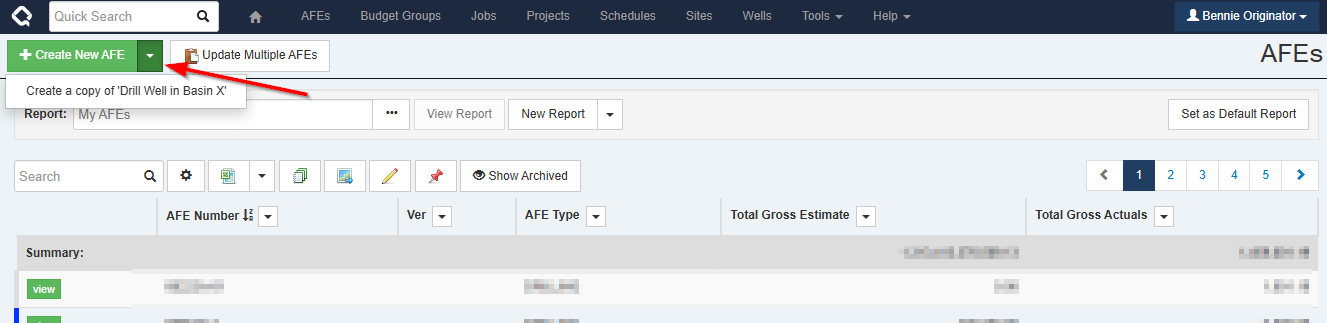
If a creator has used the template button on an AFE or a Job to create their own templates, these user templates will also be listed under the “Create New” button, along with any Global Templates.
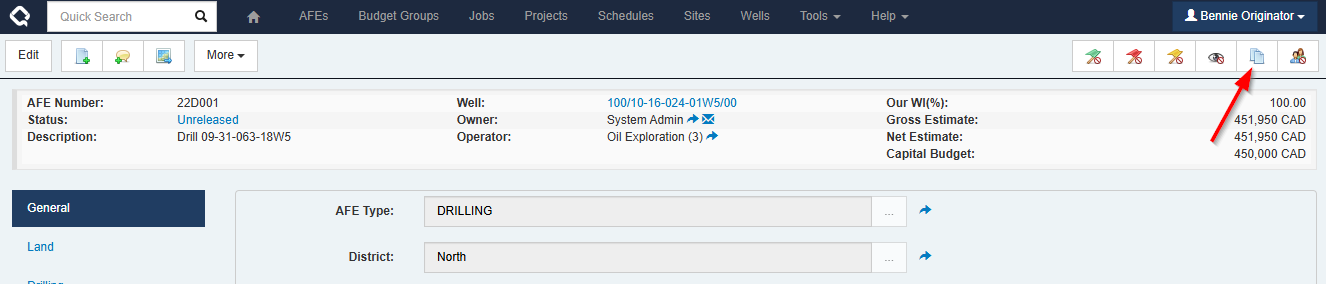
There are two columns that can been added to a browse report in order to find documents that have been marked as a Global Template:
- Is Global Template
- Global Template Description
A creator will only see Global Templates listed that they have permissions to see, according to their view rights.
Note: If your organization uses advanced workflows and plans to use the Global Templates feature, you may want to adjust the workflow activation rules to exclude documents marked as a Global Template.
Enhancements
-
Added support for Alberta, British Columbia and Manitoba staying on daylight time after November 2026, so dates and times in those provinces no longer shift an hour. A valid time zone saved on a user’s profile is also no longer overwritten at login when the browser reports a different one.
#system
#ui
21.1.332
#1893829
Alberta, British Columbia and Manitoba stop changing to standard time in November 2026. Execute now follows the new rules, so dates and times for users in those provinces stay on daylight time and don’t fall back an hour on November 1.
Action recommended: check the time zone saved on each user’s profile in Alberta, and set it toAmerica/Edmontonif it is anything else. Users in British Columbia and Manitoba should useAmerica/VancouverandAmerica/Winnipeg.Updating users’ time zones: Search or filter the user list to show only the affected users, then use the “Bulk Update” menu item on the “Timezone” column to set the new value.
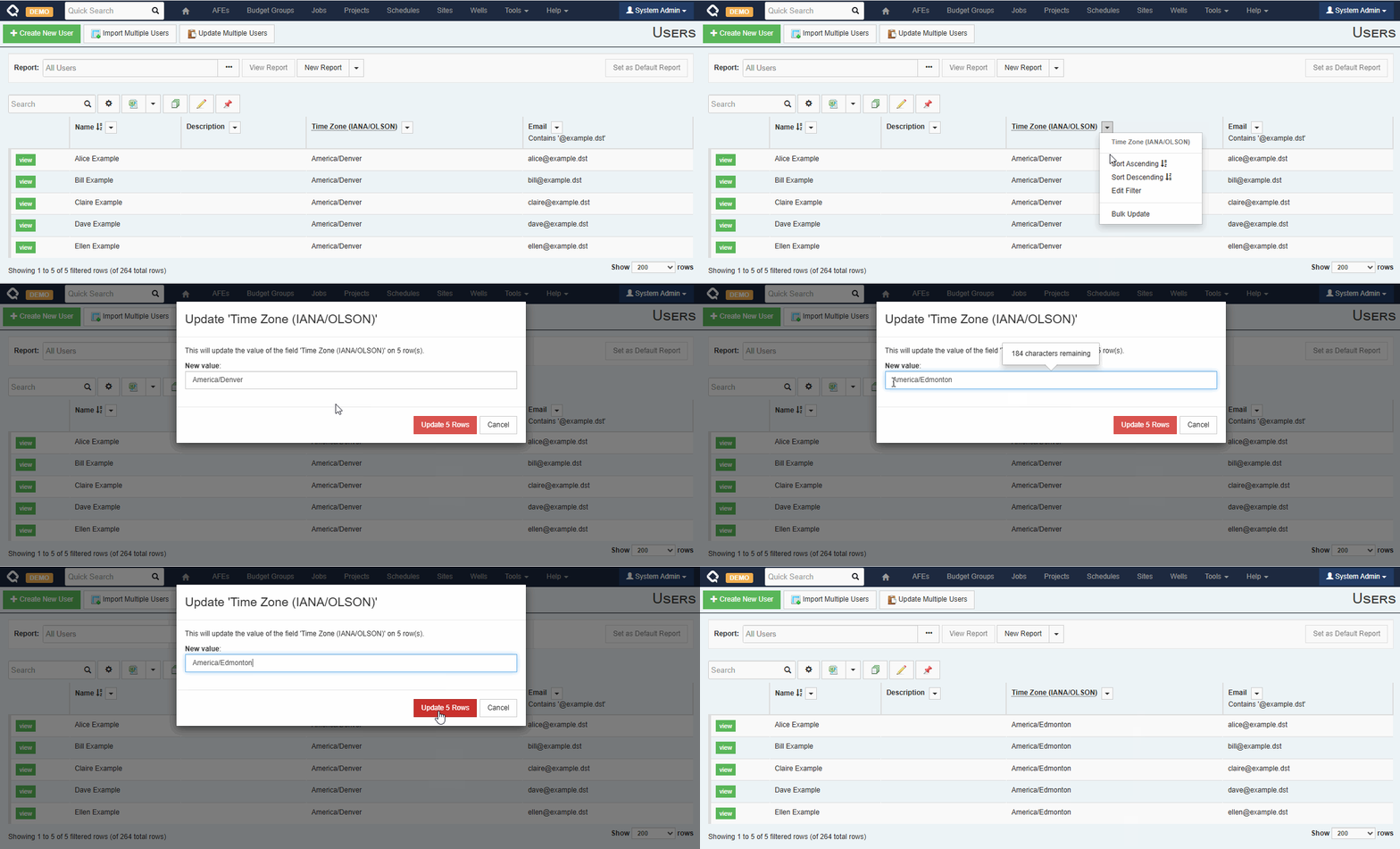
Why check profiles: Users’ time zones are derived from their web browser settings, but browsers in Alberta may sometimes report
America/Denveras their time zone, depending on Windows settings and browser versions. This used to be fine because the rules were the same in both places. Now, users in Alberta with anAmerica/Denversetting will see incorrect local times.Windows servers: the new Alberta, British Columbia and Manitoba time zones come with the October 2026 Windows update. Execute v332 works the same on servers without it, so you don’t need to install the update for this change.
- Updated the SSH.NET library used for SFTP file exports. #security #integration 21.1.329 #1863885
- Added Group Partner Approval fields to AFEs, including Group Partner Approval Parent AFE and Is Group Partner Approval Component AFE, which can be added to AFE browse reports. 21.1.329 #1831723
- When you send a ballot on behalf of an affiliate company, partners now see that affiliate as the operator, rather than your main operating company. #balloting #afe 21.1.329 #354355
- Execute now warns you before you resend a ballot if partners have already responded or a final status has already been sent. Resending erases their responses and asks them to respond again. #balloting #ui 21.1.329 #297758 #352370
- Electronic Balloting now lists the operator and the partner receiving the ballot at the top of a ballot’s partner list, with a label identifying each. #balloting #ui 21.1.329 #354651
- Electronic Balloting: Send to Partners reports each partner whose organization mapping is inactive or invalid. #balloting #ui 21.1.329 #1844948
- Electronic Balloting: Some notifications were being sent to users who didn’t need them; those have been fixed. #balloting #email 21.1.329 #1837173
- Electronic Balloting no longer assumes that ballot responses match AFE statuses exactly, so responses are correctly updated if an AFE’s approval type changes after it was sent (for example, to Mail Ballot). #balloting 21.1.329 #353970
- The scheduled Electronic Balloting synchronization no longer generates an empty log file on systems where Electronic Balloting isn’t configured. #balloting #system 21.1.329 #1879029
- Improved file attachments: They now transfer via HTTP POST operations with no visible file-specific URL. The UI now consistently offers both the view-in-browser and download option. #attachments #ui 21.1.328 #1845349
- Enabled compatibility mode for page unload events to prevent the possibility of spurious locked documents caused by the ongoing plan to deprecate unload events in Chrome. #system #ui #performance 21.1.328 #1846216
-
Updated the SQL-based Schedule import plugin (
schedule\query\query_based_schedule.config.sample) to support database connections via the integration agent. #opsched #integration agent 21.1.328 #1848713 - Improved the logging for the Bulk Sync API by adding a new verbose parameter that, when enabled, logs each CSV row’s processing outcome—even if unchanged. We’ve also clarified row numbering to match Excel row numbers. #api 21.1.326 #360356
-
Custom list field values can now automatically populate CREATOR and OWNER fields, making it easy to build rules based on who created or owns a given value.
#admin
#ui
21.1.326
#363590
To track the Creator and Owner names on a custom document, create CREATOR and OWNER list fields on the document in question (Tools > Configuration > document name > configure rules & fields). These fields need to use User as the “Existing Doc Type”.
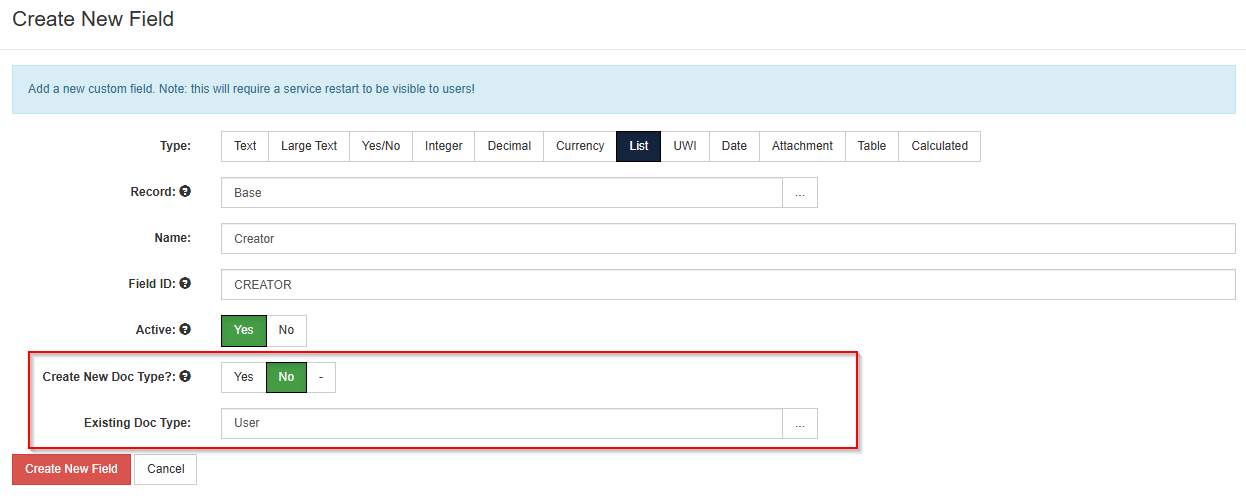
To enable this functionality, update the “Populate CREATOR and OWNER” setting to “Yes” (Tools > Configuration > Settings).
Now when creating new list values for this field, it will automatically populate the Creator and Owner fields with the name of the user who is creating the list item. You can update the Creator and Owner fields to other user names, as needed.
- When a valid Rystad API Key is configured, a new panel on the Cost Well document displays direct links to Rystad dashboards and reports. This makes it easier to access relevant Rystad data to provide context to the query results. #integration #ui 21.1.326 #360231
- Updated the list controls for a document’s Browse Fields and Identifying Fields to make it easier to select the top-level document and expand lists for child documents. #ui 21.1.326 #359716
- The support package generator now has a size limit to preserve performance when large quantities of logs exist. It will send only the most recent data if the file size limit is reached. #system #performance 21.1.326 #362990
- Items in the support package generator which the current user cannot download are included in the UI and labeled as “Send to support only” so they can be sent directly to the Execute support team without being included in a downloaded package. #system #ui 21.1.326 #362990
- Some performance improvements to the Add Company list for the AFE Partners table by optimizing how partners are searched, sorted, and prepared for display. #performance #afe 21.1.326 #1830371
- The print dialog for non-AFE documents has been enhanced with search and select all capabilities. As well, you can select to generate a separate PDF file per form. The selections you make on the dialog are remembered for the next time you print a document. The downloaded PDF file will be named with the document’s display identifier and the form name. #ui 21.1.325 #362777
- The enhanced print dialog for non-AFE documents now allows you to select PDF attachments for inclusion in the PDF output or click on links to download non-PDF attachments. #attachments #ui 21.1.325 #363063
-
You can now suppress the Teams and Approvals tabs for a Job document. This will be useful for companies using advanced workflows instead of disciplines to gather information for a Job.
#ui
#well delivery
21.1.325
#361127
The Team and Approvals tabs can be turned off by adding the following to the
<castle>container inuser.config.To turn off the Teams tab:
<?define SUPPRESS_RTX_TEAM_TAB ?>To turn off the Approvals tab:
<?define SUPPRESS_RTX_APPROVALS_TAB ?> - Improved the select all functionality within table data selectors. There are now options to select all or select all on page. Footers in the selection modal show the number of selected rows from the total number available. #ui #plugins 21.1.325 #360453
- The UI character limits for comment fields are now consistent with the limits in the database. #ui 21.1.325 #359871
- Testing is complete for Databricks data selector and synchronization plugins. This functionality has been promoted from a beta version. #integration #plugins 21.1.325 #357137
- Final removal of legacy Angular library files. #system #ui #security 21.1.325 #350027
- Upgraded the DataTables javascript library to version 1.13. #ui #security #system 21.1.325 #357403
Bugs
- Fixed an issue where the Review Status and Approval Status tabs on an AFE formatted dates using the web browser’s time zone instead of the user’s selected time zone. #afe #ui 21.1.332 #1898542
- Fixed an issue where changing the value of a dropdown list setting wouldn’t be maintained unless the browser was refreshed. #admin #ui 21.1.331 #1886607
- Labels now stay left-aligned when several fields share one row, in the workflow task editor. #ui 21.1.331 #1880686
- Fixed an issue where some plugins, including the ODA export and document export event plugins, could leave behind an extra ‘internal’ session. #plugins #system 21.1.331 #1875577
- The Integration Agent now waits up to 30 minutes for a long-running server call to finish, instead of timing out after about two minutes. Its error messages also now include the name of the method that failed and a stack trace. #integration agent #integration 21.1.331 #1873839
- Fixed an issue where rental costs imported from SiteView could come through empty. SiteView cost imports now use the correct Peloton table and field names. #peloton #integration 21.1.329 #1859848
- Documents can no longer be marked as a Global Template before they have been saved. #ui #admin 21.1.329 #1875961
- Sending an AFE to partners through Electronic Balloting now only requires the Electronic Ballot Send To Partners privilege. Previously the AFE print settings were also checked, so some users with that privilege still couldn’t send. #balloting #admin 21.1.329 #357666
- The Send Final Status to Partners modal now says that a comment is required, instead of incorrectly saying that a final status is required. #ui #balloting 21.1.329 #354237
- Fixed configuration of the Electronic Balloting partner email override column: it wasn’t editable on Unreleased AFEs and didn’t copy to a new or revised AFE. #balloting #afe 21.1.329 #354264
- Fixed an issue where a failed Electronic Balloting server call during a resend showed no error in the UI. #balloting 21.1.329 #364151
- DocumentLinkTextValueCombined and similar formula functions now retrieve correct values from child documents. #formula 21.1.326 #358395
- Fixed an issue in Browse reports where users were unable to filter by Document Id on child documents. #reporting #ui #system 21.1.326 #359900
- When exporting a schedule to Enersight, the exported End Date and Duration values now handle the case where a schedule activity is interrupted by an unavailable resource. #enersight #integration #opsched 21.1.326 #361771
- In some scenarios, AFE estimates could be stored in the database with more than two decimal places and would cause failures during the export to WellEz. Estimates are now properly rounded to two decimal places on export. #wellez #integration #budget 21.1.326 #361978
- Estimates added or updated via data loaders are now automatically rounded to 2 decimal places before being saved. #afe 21.1.326 #361976
- Fixed an issue where Quorum Support users were previously able to claim a module exclusively, which blocked other licensed users from accessing it. #license 21.1.326 #365041
- An “UNDEFINED TEMPLATE” message no longer appears in the Unscheduled Jobs tab of the Operational Scheduler when a non-English browser language is configured. #ui 21.1.326 #365580
- The help text on the Order field of a Position Rule has been updated to reflect current functionality. #ui 21.1.326 #361903
- Fixed a timing issue in Firefox that prevented configuration items from being added to the Recently Used list (Tools > Configuration). #ui 21.1.326 #349254
- Fixed a race condition on the Update Project Forecast page that could cause key not found and document handle errors when users clicked the Update button. #budget #ui 21.1.326 #362234
- Improved handling of reference document list records in Blockly expressions to prevent browsers from stalling. #workflow #performance #ui 21.1.326 #362958
- Fixed an issue where auto-completed workflow tasks were triggering an email notification to the completed task’s owner. #workflow #email 21.1.326 #279894
- Corrected the behaviour when loading ad hoc reviewers from a review template while routing an AFE for review. #ui #workflow 21.1.326 #1834447
- Updated the message on the Send to Partners modal to clarify that a change to the due date for ballots already sent will require a partner to resubmit their response. #ui #balloting 21.1.326 #1836654
- Fixed an issue where Mermaid diagrams on the Tasks tab of the workflow definition would fail to render when the text size exceeded the allowed limit. #ui #workflow 21.1.325 #361653
- Performance of the Jobs tab for Wells and Sites has been improved, and a loading progress indicator has been added. #well delivery #performance #ui 21.1.325 #361640
- Performance of the My Active Tasks widget on the dashboard has been optimized and a loading progress indicator has been added. #dashboard #performance #ui 21.1.325 #362304
- Improved the efficiency of some database queries that are run during service startup. #performance #system 21.1.325 #359874
- Fixed an issue where tables in an email reminder were not rendering correctly. #email 21.1.325 #361495