Schema Changes
-
An
IS_INTERRUPTIBLEcolumn has been added to theSCH_ACTIVITY_TYPEandSCH_ACTIVITY_TYPE_Htables. 21.1.321 #347413 -
Several tables beginning with the name
COSTWELLorCOSTWELLCAThave been added to support the Rystad integration. 21.1.319 #358130 -
The
ACCOUNTSandACCOUNTS_Htables have a newCOSTWELLCATfield to allow mapping accounts to Cost Well Categories. 21.1.319 #358130 -
A
COSTWELLfield has been added to theAFEand theAFE_Htables. This field is inactive by default. 21.1.319 #358130 -
A
COSTWELLfield has been added to thePROJECTand thePROJECT_Htables. This field is inactive by default. 21.1.319 #358130
Features️
- Administrators can now create custom HTML content pages that appear as menu items under the Help menu, making it easier to provide company specific documentation directly within the application. Configuring HTML pages requires the Can Manage HTML Items user privilege (Tools > Configuration > User Roles). As well, the Display Custom HTML Help setting must be set to Yes (Tools > Configuration > Settings). #admin #ui 21.1.326 #353621
-
An administrator can mark documents as Global Templates to provide a starting point to create a new AFE, Job, Well, Site or other document.
#ui
#admin
21.1.325
#361485
To create, edit, or remove Global Templates, you must have the Manage Global Templates privilege. Users with this privilege will see an “All Global Templates” report in the report list on the browse page of eligible documents.
To mark a document as a Global Template, view the document and select “More > Mark as Global Template”. A Global Template Description is required and can guide creators as to the information within that template. Documents that are marked as a Global Template can only be edited by users with the Manage Global Templates privilege. Once a document is marked as a Global Template, creators will see a list of the templates under the “Create New” button.
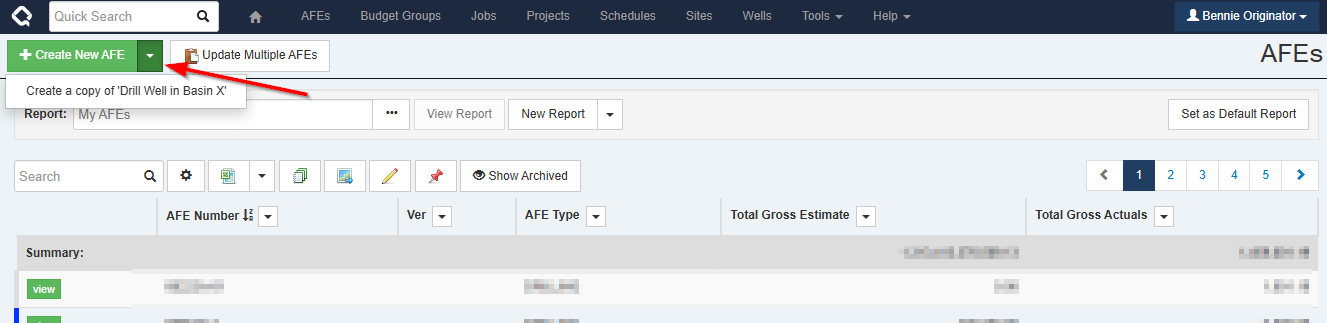
If a creator has used the template button on an AFE or a Job to create their own templates, these user templates will also be listed under the “Create New” button, along with any Global Templates.
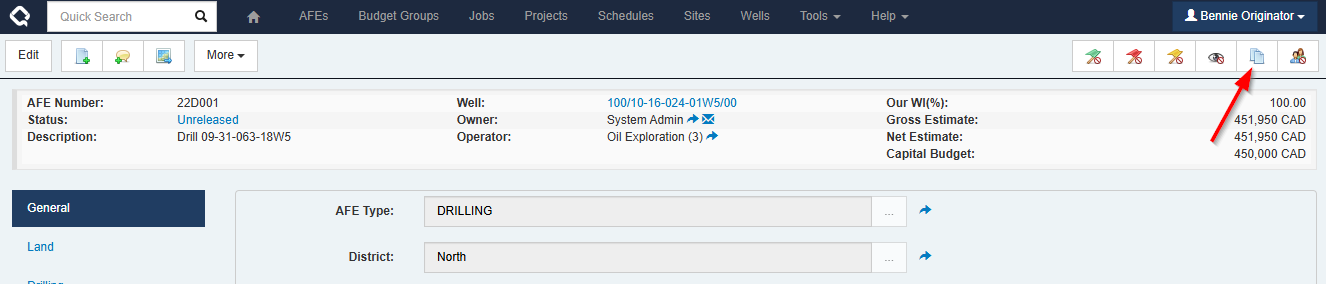
There are two columns that can been added to a browse report in order to find documents that have been marked as a Global Template:
- Is Global Template
- Global Template Description
A creator will only see Global Templates listed that they have permissions to see, according to their view rights.
Note: If your organization uses advanced workflows and plans to use the Global Templates feature, you may want to adjust the workflow activation rules to exclude documents marked as a Global Template.
-
Introducing the Bulk Sync API to streamline your data synchronization process. The functionality of the Document Synchronization plugin is now available as an API endpoint with a straightforward CSV data format.
#api
#system
21.1.323
#351573
Bulk Sync API
A new API (
POSTto/api/bulk/sync) allows bulk creation, updating, and inactivation of documents using CSV data.This can be used to keep a list of data in Execute synchronized with an external system. Any tool that can extract data as a CSV file and perform an HTTP POST will now be able to update Execute data.
Example Usage
The API is reached at
https://YOUR_SERVER/api/bulk/sync?type=PARTNER&dryrun=true.Authentication uses Execute API Keys via HTTP Basic Auth.
The
type=query parameter is required and indicates which Execute document type will be updated.Other parameters are available to control the sync behaviour, see the documentation.
The
dryrun=trueparameter is useful for testing — it runs the full sync and returns a report of what would happen without making any changes to the data. Remove it (or set it tofalse) when ready to commit.Each row in the CSV identifies one or more documents and provides value columns to update the data on the matched document(s).
The CSV header row contains the field path for each column. Columns prefixed with
$are key columns used to find matching documents; the remaining columns are the values to update.Here is a CSV for Execute PARTNER data which will match on the partner code to update the name and address.
COMNAME,$CODE,STRADDRESS
Sesame Exploration,39,123 Sesame Street
Micro Eggbert Oil,12,"1111, 111 - 1st Avenue S.W."
Example Ltd.,10,"3300, 333.3 - 3rd Avenue S.W."
It could be sent to the Execute API with
curllike so:curl -u "$APIKEY_ID:$APIKEY_KEY" \ -X POST "https://YOUR_SERVER/api/bulk/sync?type=PARTNER&dryrun=true" \ -H "Content-Type: text/csv" \ --data-binary @sample.csvWith
dryrun=true, the response shows what would happen without making any changes:Record,Level,Message 1,Info,DRY RUN: Would update document a1b2c3d4-... 2,Info,DRY RUN: Would update document b2c3d4e5-... 3,Info,DRY RUN: Would update document c3d4e5f6-... Summary,Info,"Summary: 0 created, 3 updated, 0 unchanged, 0 inactivated, 0 errors, 0 warnings"Once the results look correct, remove
dryrun=trueto commit the changes. The response will then confirm what was actually updated:Record,Level,Message 1,Info,Updated document a1b2c3d4-... 2,Info,Updated document b2c3d4e5-... 3,Info,Updated document c3d4e5f6-... Summary,Info,"Summary: 0 created, 3 updated, 0 unchanged, 0 inactivated, 0 errors, 0 warnings" -
Schedule activities can now automatically extend their duration when a resource is unavailable. This can be used to implement “5-Day Scheduling” by marking the weekends as unavailable time on a resource. So go ahead - give your crews weekends off!
#opsched
#ui
21.1.321
#347413
Interrupted Schedule Activities
Schedule activities can now be set as interruptible or non-interruptible (
Tools > Configuration > Schedule Activity Types). If an activity is interruptible, the activity’s duration will extend when it overlaps an exclusion period on the primary resource.Please note that the Enersight schedule integration does not yet export the extended duration values for activities which are interrupted. We will change this in an upcoming release.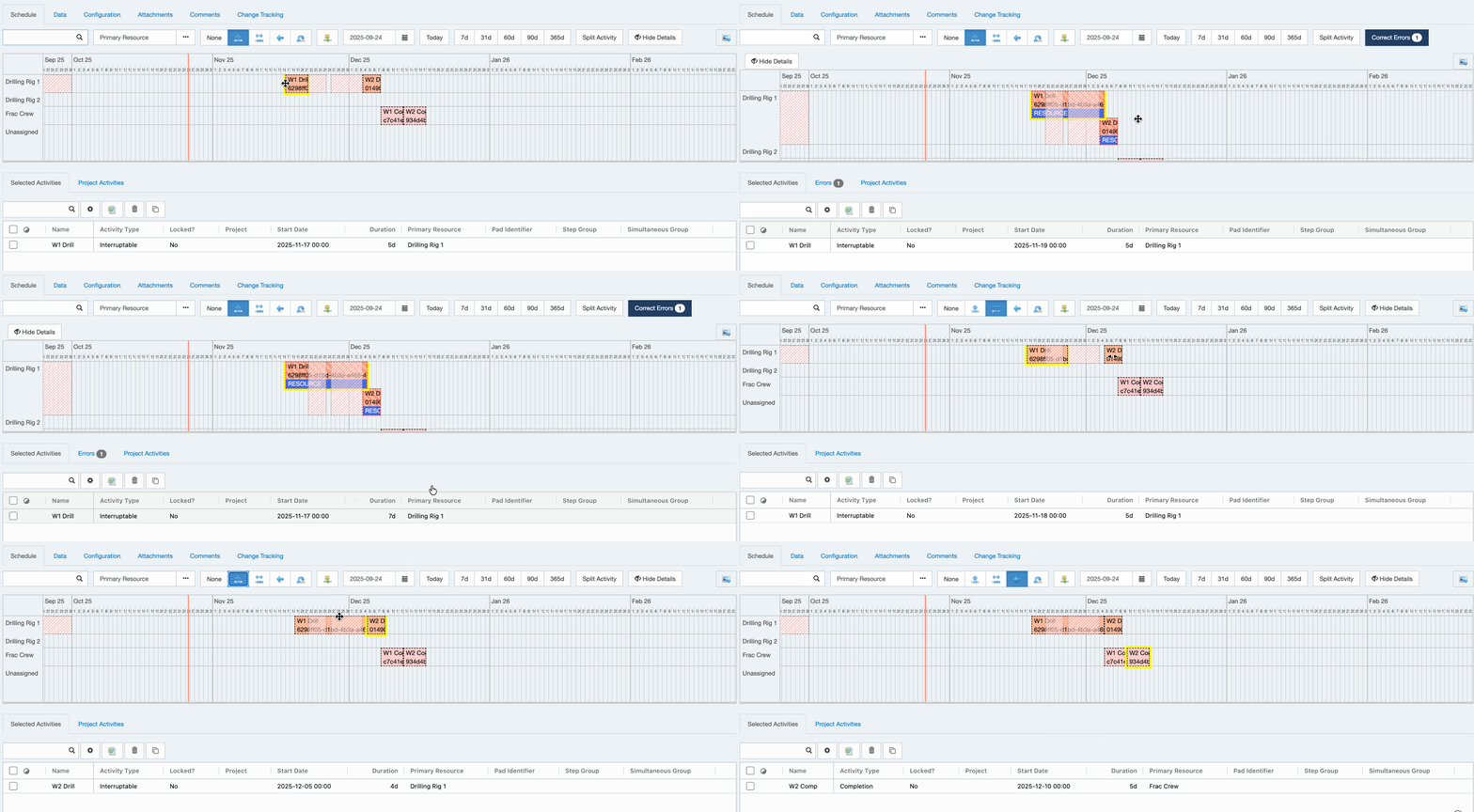
For example: An activity with a 4 day duration is assigned a primary resource that is not available on a weekend.
- If the activity starts on a Monday, the activity runs on Monday, Tuesday, Wednesday, Thursday.
- If the activity starts on a Thursday, the activity runs Thursday, Friday, takes the weekend off, and continues Monday and Tuesday.
The
Durationfield on the activity does not change as it will continue to show the “actual” duration of the work. When viewing the content on the activity, you would see an elapsed duration that includes the time that the resource is unavailable.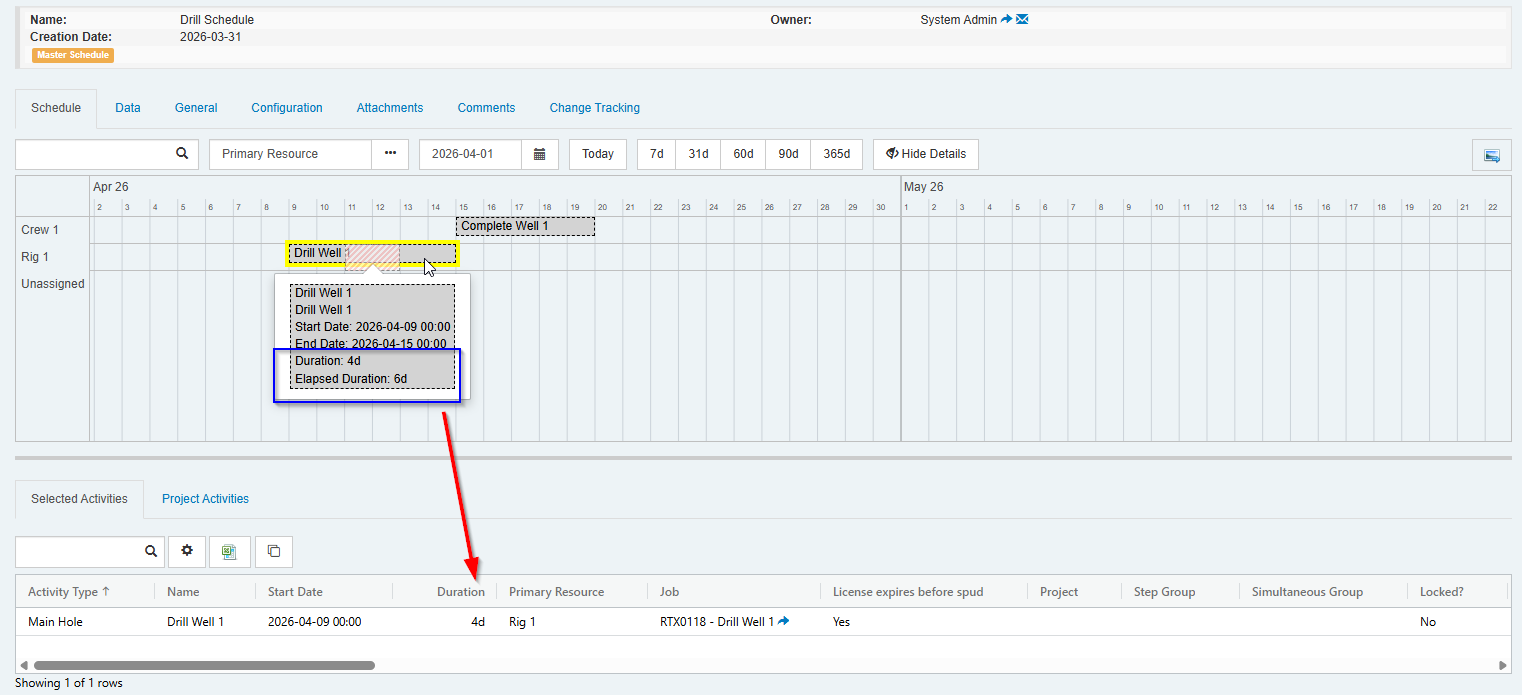
A Job that is linked to an interrupted activity will show the elapsed duration (see example of linked Job below).
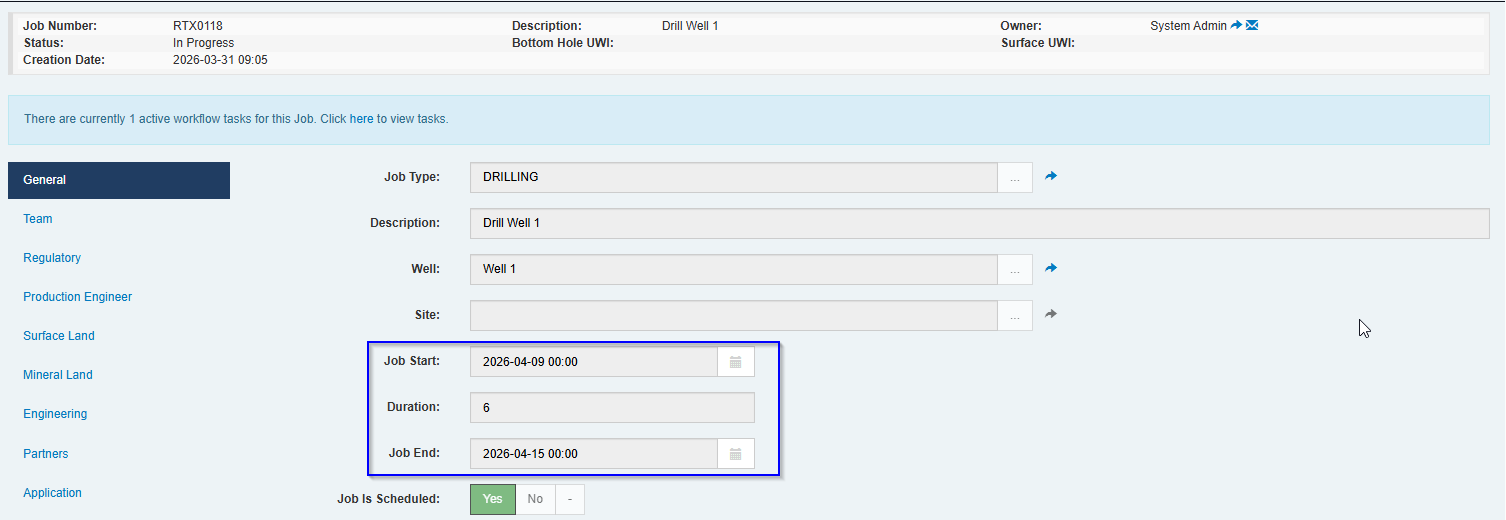
An interrupted schedule activity that is linked to a capital activity on a project will cause the project to appear in the Due for Forecast list, as the timing for the activity has changed.
-
Execute now integrates with Rystad Energy to bring their world-wide, industry data directly into the AFE and Capital Budgeting (Projects) workflow. A “Cost Well” entity has been added to serve as a capital-focused template for a well. AFEs and Projects linked to a Cost Well can display validation messages if the estimates or capital for project activities doesn’t align with the benchmark data in the Cost Well.
#integration
#well
#afe
#budget
21.1.319
#358130
Rystad Integration
The Rystad integration requires a subscription to Rystad Energy but there is no additional licensing required for Execute.
At a high level, the integration allows Execute to:
- Query capital data from Rystad and load that data to a Cost Well entity (or a document if we’re using Execute lingo!)
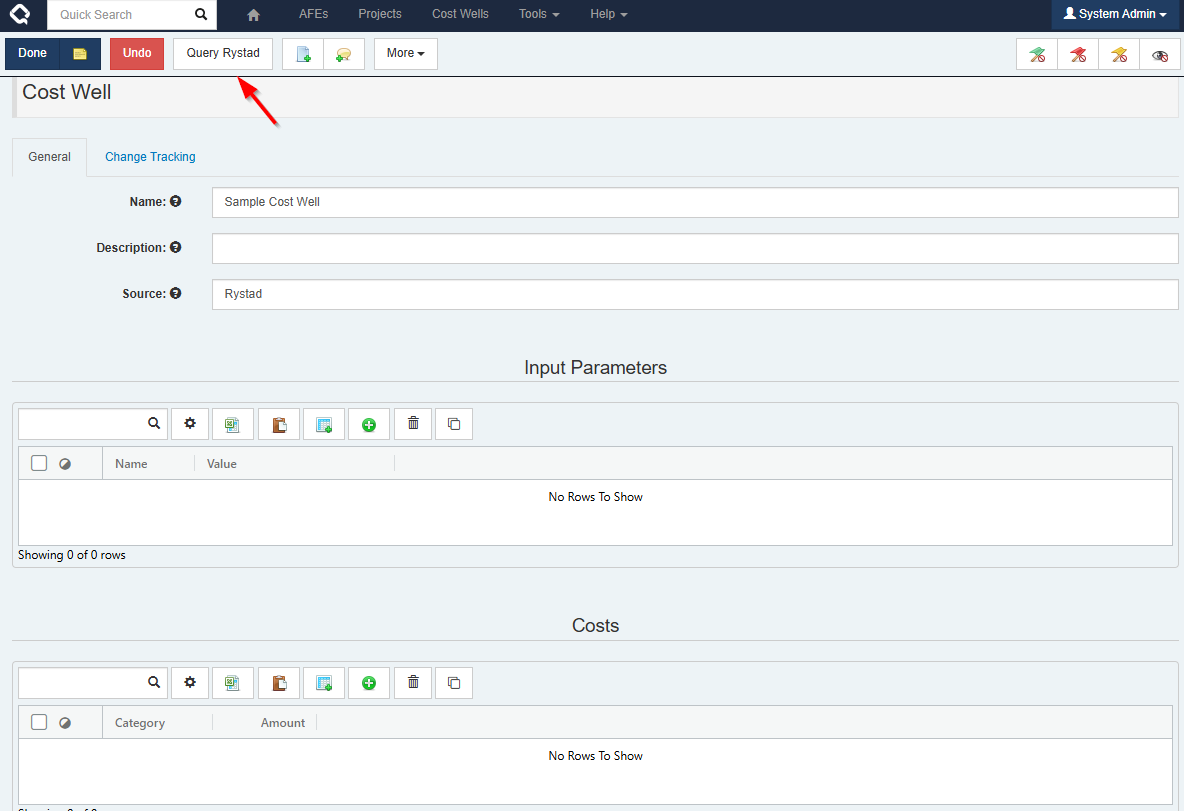
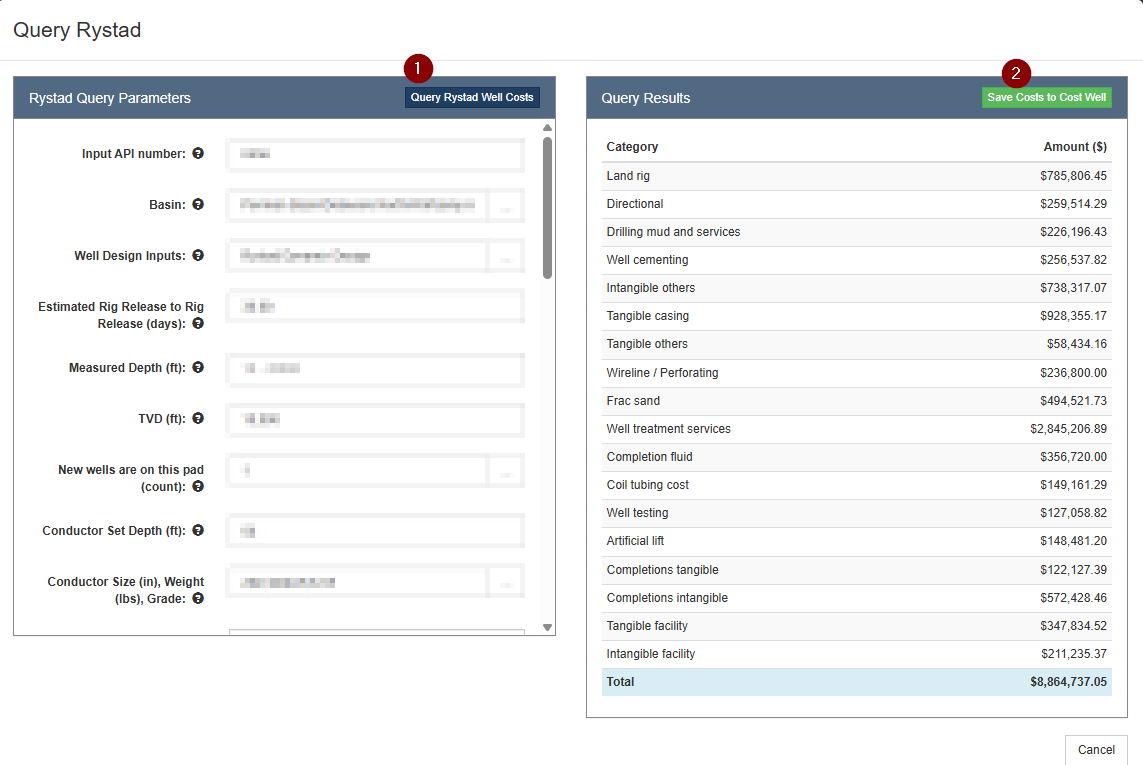
The input parameters used for the query and the resulting costs are written to tables on the Cost Well. The costs are organized in categories that we refer to as Cost Well Categories.
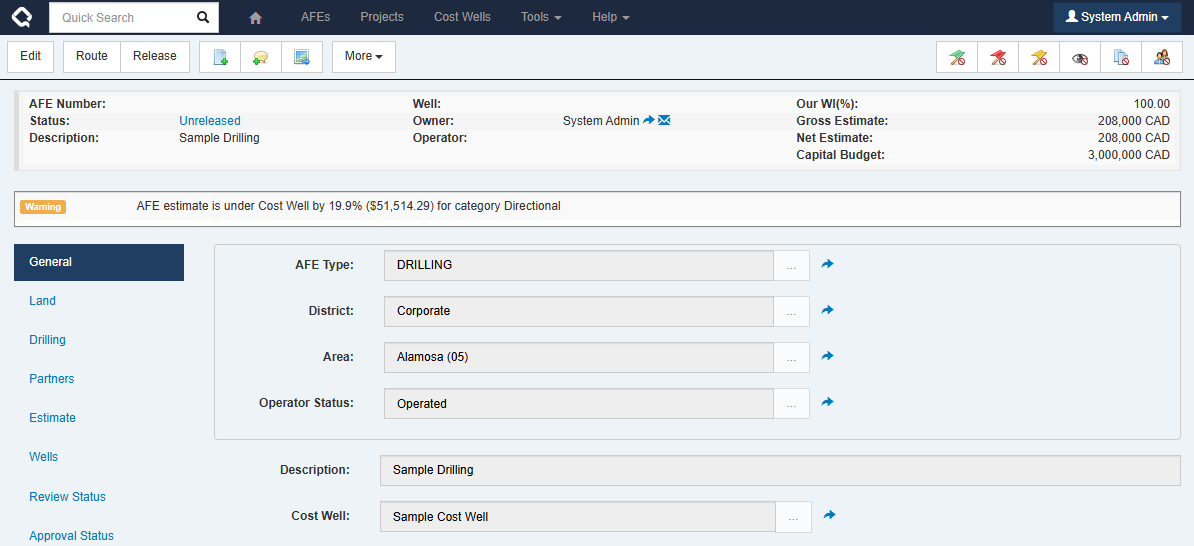
- For an AFE, the GL accounts are mapped to Cost Well Categories. Then, you can link a Cost Well to your AFE and validation messages appear if the AFE’s estimate is under or exceeds the costs in the Cost Well.
- For a Project, Cost Well Categories are mapped to project activity types. By linking a Cost Well to a Project, validation messages are displayed if your costs do not align with the mapped cost well category.
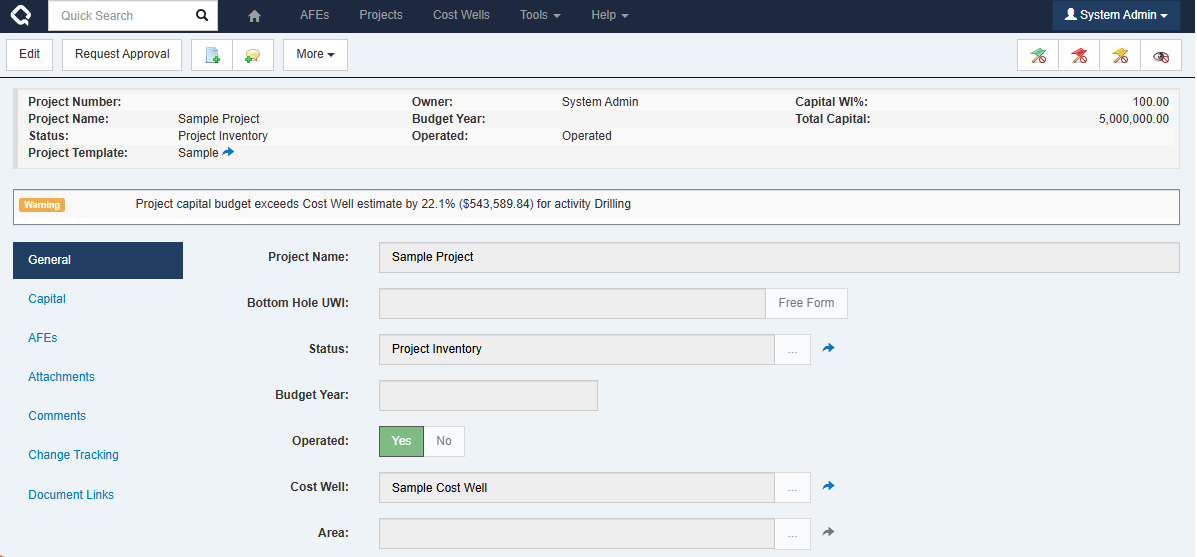
This doesn’t replace the current detailed estimation process that our customers use today. This isn’t authoring the estimate. The goal is context and confidence, not replacing engineering judgment.
Enhancements
- Improved file attachments: They now transfer via HTTP POST operations with no visible file-specific URL. The UI now consistently offers both the view-in-browser and download option. #attachments #ui 21.1.328 #1845349
- Enabled compatibility mode for page unload events to prevent the possibility of spurious locked documents caused by the ongoing plan to deprecate unload events in Chrome. #system #ui #performance 21.1.328 #1846216
-
Updated the SQL-based Schedule import plugin (
schedule\query\query_based_schedule.config.sample) to support database connections via the integration agent. #opsched #integration agent 21.1.328 #1848713 - Improved the logging for the Bulk Sync API by adding a new verbose parameter that, when enabled, logs each CSV row’s processing outcome—even if unchanged. We’ve also clarified row numbering to match Excel row numbers. #api 21.1.326 #360356
-
Custom list field values can now automatically populate CREATOR and OWNER fields, making it easy to build rules based on who created or owns a given value.
#admin
#ui
21.1.326
#363590
To track the Creator and Owner names on a custom document, create CREATOR and OWNER list fields on the document in question (Tools > Configuration > document name > configure rules & fields). These fields need to use User as the “Existing Doc Type”.
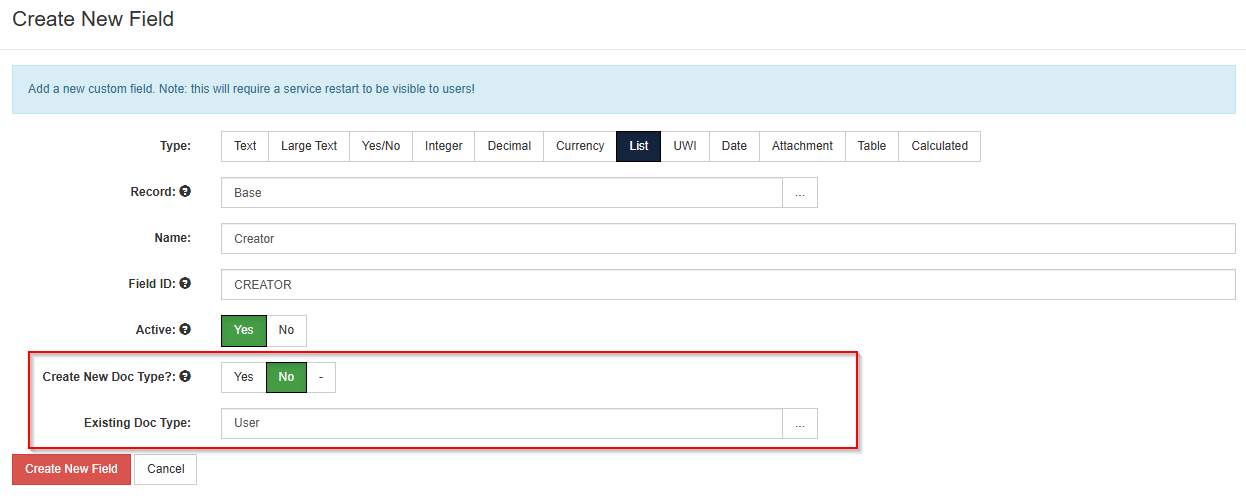
To enable this functionality, update the “Populate CREATOR and OWNER” setting to “Yes” (Tools > Configuration > Settings).
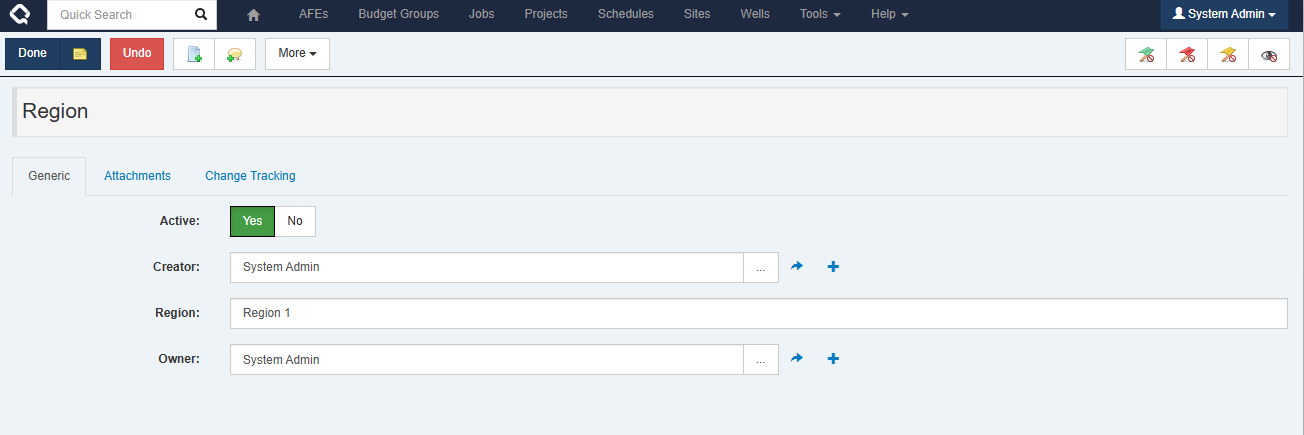
Now when creating new list values for this field, it will automatically populate the Creator and Owner fields with the name of the user who is creating the list item. You can update the Creator and Owner fields to other user names, as needed.
- When a valid Rystad API Key is configured, a new panel on the Cost Well document displays direct links to Rystad dashboards and reports. This makes it easier to access relevant Rystad data to provide context to the query results. #integration #ui 21.1.326 #360231
- Updated the list controls for a document’s Browse Fields and Identifying Fields to make it easier to select the top-level document and expand lists for child documents. #ui 21.1.326 #359716
- The support package generator now has a size limit to preserve performance when large quantities of logs exist. It will send only the most recent data if the file size limit is reached. #system #performance 21.1.326 #362990
- Items in the support package generator which the current user cannot download are included in the UI and labeled as “Send to support only” so they can be sent directly to the Execute support team without being included in a downloaded package. #system #ui 21.1.326 #362990
- Some performance improvements to the Add Company list for the AFE Partners table by optimizing how partners are searched, sorted, and prepared for display. #performance #afe 21.1.326 #1830371
- The print dialog for non-AFE documents has been enhanced with search and select all capabilities. As well, you can select to generate a separate PDF file per form. The selections you make on the dialog are remembered for the next time you print a document. The downloaded PDF file will be named with the document’s display identifier and the form name. #ui 21.1.325 #362777
- The enhanced print dialog for non-AFE documents now allows you to select PDF attachments for inclusion in the PDF output or click on links to download non-PDF attachments. #attachments #ui 21.1.325 #363063
-
You can now suppress the Teams and Approvals tabs for a Job document. This will be useful for companies using advanced workflows instead of disciplines to gather information for a Job.
#ui
#well delivery
21.1.325
#361127
The Team and Approvals tabs can be turned off by adding the following to the
<castle>container inuser.config.To turn off the Teams tab:
<?define SUPPRESS_RTX_TEAM_TAB ?>To turn off the Approvals tab:
<?define SUPPRESS_RTX_APPROVALS_TAB ?> - Improved the select all functionality within table data selectors. There are now options to select all or select all on page. Footers in the selection modal show the number of selected rows from the total number available. #ui #plugins 21.1.325 #360453
- The UI character limits for comment fields are now consistent with the limits in the database. #ui 21.1.325 #359871
- Testing is complete for Databricks data selector and synchronization plugins. This functionality has been promoted from a beta version. #integration #plugins 21.1.325 #357137
- Final removal of legacy Angular library files. #system #ui #security 21.1.325 #350027
- Upgraded the DataTables javascript library to version 1.13. #ui #security #system 21.1.325 #357403
- We’ve improved file attachments by adding a progress meter to drag-and-drop uploads, enforcing a consistent 256MB file size limit, and showing clearer error messages when uploads fail. #attachments #ui 21.1.323 #359298
- Added extra diagnostic info to some internal error messages, making it simpler to understand what went wrong when data is missing or invalid. #workflow #system 21.1.323 #360005
- The Dashboard layout has been migrated from Angular to React. #dashboard #ui #system 21.1.321 #350026
- The RTD Partners table has been migrated from Angular to React. #ui #system #well delivery 21.1.321 #351443
- The Settings management has been migrated from Angular to jQuery. #admin #ui #system 21.1.321 #350022
- The Support Package page been migrated from Angular to jQuery. #admin #ui #system 21.1.321 #350020
- Added DOMPurify to sanitize Markdown rendering in areas like field-level help text and Message of the Day. This prevents scripts and raw HTML from executing within Markdown fields, improving security while preserving the existing Markdown experience. #security #ui #system 21.1.321 #357967
- A sample plugin and xslt file for the integration with Quorum Cost Accounting has been added to the plugins repository. #integration #afe #plugins 21.1.319 #357564
- A new alphabetical filter bar has been added to the Configuration page, making it easier for users to find specific configuration items. #ui 21.1.319 #357589
Bugs
- DocumentLinkTextValueCombined and similar formula functions now retrieve correct values from child documents. #formula 21.1.326 #358395
- Fixed an issue in Browse reports where users were unable to filter by Document Id on child documents. #reporting #ui #system 21.1.326 #359900
- When exporting a schedule to Enersight, the exported End Date and Duration values now handle the case where a schedule activity is interrupted by an unavailable resource. #enersight #integration #opsched 21.1.326 #361771
- In some scenarios, AFE estimates could be stored in the database with more than two decimal places and would cause failures during the export to WellEz. Estimates are now properly rounded to two decimal places on export. #wellez #integration #budget 21.1.326 #361978
- Estimates added or updated via data loaders are now automatically rounded to 2 decimal places before being saved. #afe 21.1.326 #361976
- Fixed an issue where Quorum Support users were previously able to claim a module exclusively, which blocked other licensed users from accessing it. #license 21.1.326 #365041
- An “UNDEFINED TEMPLATE” message no longer appears in the Unscheduled Jobs tab of the Operational Scheduler when a non-English browser language is configured. #ui 21.1.326 #365580
- The help text on the Order field of a Position Rule has been updated to reflect current functionality. #ui 21.1.326 #361903
- Fixed a timing issue in Firefox that prevented configuration items from being added to the Recently Used list (Tools > Configuration). #ui 21.1.326 #349254
- Fixed a race condition on the Update Project Forecast page that could cause key not found and document handle errors when users clicked the Update button. #budget #ui 21.1.326 #362234
- Improved handling of reference document list records in Blockly expressions to prevent browsers from stalling. #workflow #performance #ui 21.1.326 #362958
- Fixed an issue where auto-completed workflow tasks were triggering an email notification to the completed task’s owner. #workflow #email 21.1.326 #279894
- Corrected the behaviour when loading ad hoc reviewers from a review template while routing an AFE for review. #ui #workflow 21.1.326 #1834447
- Updated the message on the Send to Partners modal to clarify that a change to the due date for ballots already sent will require a partner to resubmit their response. #ui #balloting 21.1.326 #1836654
- Fixed an issue where Mermaid diagrams on the Tasks tab of the workflow definition would fail to render when the text size exceeded the allowed limit. #ui #workflow 21.1.325 #361653
- Performance of the Jobs tab for Wells and Sites has been improved, and a loading progress indicator has been added. #well delivery #performance #ui 21.1.325 #361640
- Performance of the My Active Tasks widget on the dashboard has been optimized and a loading progress indicator has been added. #dashboard #performance #ui 21.1.325 #362304
- Improved the efficiency of some database queries that are run during service startup. #performance #system 21.1.325 #359874
- Fixed an issue where tables in an email reminder were not rendering correctly. #email 21.1.325 #361495
- Fixed a “DocumentHandle not found” error on workflow tasks when multiple fields on a referenced document are used and certain combinations of them are non editable. #workflow 21.1.324 #362694
- Fixed a timezone comparison issue that prevented position rules with start dates near the current time from activating correctly on jobs. This ensures delegation and position rules now trigger as expected regardless of timezone differences. #well delivery #system 21.1.323 #358838
- The connection to the Dynamic Docs API now restricts attribute values to a maximum length of 255 characters. #plugins 21.1.323 #357818
- The ODA DOI selector now correctly handles identical duplicate records. #ondemand #plugins 21.1.323 #361364
- “Primary Well” fields were missing from the Update Multiple UI. They have returned! When updating multiple records you can once again select the Primary Well fields. #afe #ui 21.1.323 #360400
-
Fixed the issue where fields with a
CUSTOM/path could not be edited on referenced documents. #workflow 21.1.323 #357763 - Corrected the error message when a workflow task referred to an inactive field. #workflow 21.1.323 #358372
- Fixed an issue where editing fields on referenced documents causes intermittent save failures and the SQL Warehouse sync to fail with a duplicate key error. #workflow 21.1.323 #358841
- Fixed an issue where the workflow task UI is not editable when it only contains fields from referenced documents. #workflow 21.1.323 #358973
- Attachments now download successfully from attachment fields belonging to other document types. #workflow #attachments 21.1.323 #357763
- Attachment fields in workflow tasks now behave consistently with other fields, including the ability to change label colors and display shared field and lock icons. #workflow #attachments #ui 21.1.321 #358788
- The fields shown in the document header will wrap long lines of text instead of overlapping the next field. This issue would have been most noticeable on smaller displays, like mobile devices. #ui 21.1.321 #357820
- Fixed an issue where file attachments in attachments tables did not sort correctly by date. #attachments #ui 21.1.321 #352736
- The sample events_approval_snapshot.config plugin no longer causes the service to enter recovery mode. #system 21.1.321 #359680
- Increased caching and managed threading to prevent cases where large sets of updates (through Import or Update Multiple) can cause excessive CPU and memory usage. #system #performance 21.1.321 #358871
- Email notifications will now send when a partner status synchronization from Execute Electronic Balloting occurs and results in the status of the AFE changing to Fully Approved or Partner Rejected. #afe #balloting #email 21.1.320 #360038
- Fixed an issue where some file attachments would fail to appear, due to a file being locked. A service restart would be required to bring them back and no errors were shown on the Attachments tab to indicate that there was a problem. Now an error message is displayed on the Attachments tab and further information regarding the locked file can be found in the server log or the support package. . #attachments 21.1.319 #358257
- Resolved an error when generating a forms package per partner, when the forms are configured to print only for certain partners. #forms 21.1.319 #353941
- Workflow diagrams will now generate if a task name in a sub-workflow, or the sub-workflow name, includes an ampersand (’&’). #workflow #ui 21.1.319 #356452
- Field paths displayed on the Required Fields tab in the Discipline configuration page now include the slashes. #ui 21.1.319 #349687
- Fixed an issue where the application’s built-in emails were failing. #email 21.1.319 #358794
- Addressed a performance issue when loading Wells using the spreadsheet loaders. #well #loader #performance 21.1.319 #356132